
How to Ensure Business Continuity
We’ve come a long way since then of course, but disasters come in many forms (malfunctions, cybercrime, data center equipment failures, power outages, etc.), and no business is immune. In 2018, Microsoft, Google Cloud, Slack, Visa and a number of other companies experienced downtime due to failures. The reasons behind those failures were human errors, equipment failure, bugs in code and improper load balancing for cloud infrastructure.
Fortunately, neither of those outrages lasted for longer than a few hours. As all of the companies had comprehensive a disaster recovery plan that includes processes and procedures for how to ensure business continuity during the disaster. In fact, 47% of enterprises and 38% of smaller companies now use disaster recovery for at least half of their production infrastructure. But disaster recovery mechanisms alone cannot guarantee you business continuity.
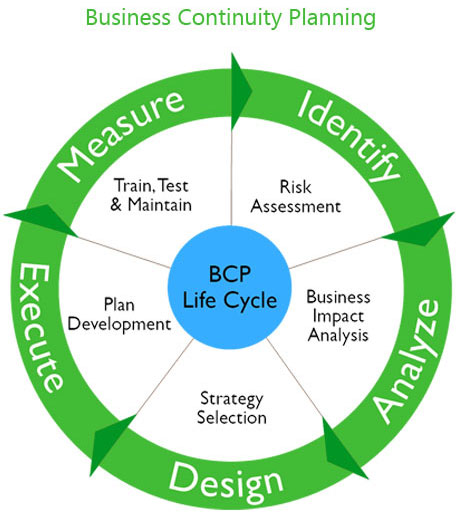
Business Continuity and Disaster Recovery Plans are Not the Same
These terms are often used interchangeably but, in fact are very different.
Business continuity (BC) is a proactive approach to dealing with the risk of a disaster, ensuring that normal business operations can go on. Typical components of such a plan include solutions for the challenges of all IT needs – network connections, phones, network drives, servers, and other business applications. The goal of business continuity management is no downtime.
Disaster recovery plans (DRP) are reactive. Once a disaster hits, it is this plan that provides for restoration of the IT infrastructure, accessing copies of data that is stored offsite, and picking up all the pieces in a structured, organized way. Its focus is on recovery time.
A simple example of the difference would be this: a business continuity plan would include temporary facilities for essential department personnel and getting the proper equipment to that facility. A disaster recovery plan includes the pre-planned activities of the staff once it is established in its temporary facility.
Exactly What is a Disaster Recovery Plan?
First and foremost, a disaster recovery plan is a structured and fully documented roadmap with instructions for recovering all potentially vulnerable systems and networks. It includes every step to be taken who is responsible for each of those steps.
Large enterprises often have an on-premises recovery plan – one that is expensive to implement and maintain. And, as well, it is certainly not foolproof against power failures, fires, and other natural disasters. When the big ones hit, continuous backup doesn’t occur. The other option, of course, is for the backups to be physically housed somewhere else.
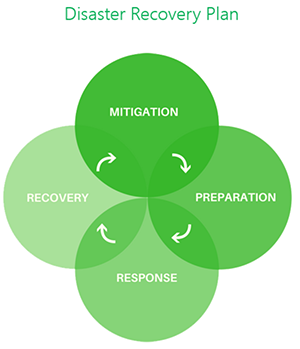
Advantages of Having a DRP
These should be obvious:
1. You will have a detailed plan for protection of your data and your hardware.
2. You will experience far less yearly downtime
3. Implementation of the plan will help to maintain your reputation with clients/customers
4. It will assist with business continuity, including continuous 24/7 IT support as is often necessary
5. It will provide the methods by which you can test your plan
6. It will give your organization, especially upper level management, with a sense of security
When Cloud Disaster Recovery is The Best Option
Creating the plan when cloud services are in place will help to alleviate and simplify the control measures that must be put in place, as well as enable faster recovery of data and infrastructure. The key will be to identify those critical elements and applications that must be placed in the cloud in order for seamless continuation of business operations. Once that has been accomplished, the following steps are key:
• Data must be backed up on a regular basis
• A cost analysis must be conducted, so that the cloud services meet budget objectives.
• Decide on the recovery time objective. This will determine the type of cloud services you need and will impact cost.
• Identify the critical applications that must be moved to the cloud and how quickly you need the recovery – this will determine the recovery architecture you choose. Options vary from simple backup and restoration all the way to what is known as a “hot standby,” which usually involves copying data and applications among more than one active location, splitting up the traffic and routing that traffic so that there is no downtime whatsoever.